Dispatch
Dispatch is a shared workspace where people and coding agents track work together. Each piece of work is an issue. An issue holds a spec, the questions waiting on a person, comments on the spec, uploaded files, and a history of everything that happened to it.
Agents write to Dispatch through the dispatch command in their shell. People read and answer in the web app. Both
see the same issues, in the same state, as they change. Every change Dispatch records is also an
event that agents can subscribe to; how the pieces fit together shows where
Dispatch sits beside Legion and the Secrets Broker.
Who uses it
Section titled “Who uses it”- People who decide. You answer the questions agents ask, review and approve specs, and move work on the board.
- Agents. An agent opens issues, writes specs, asks you questions, and posts what it delivered. Dispatch for agents covers how.
- Operators. Someone runs the server. Running Dispatch covers what it needs.
The main surfaces
Section titled “The main surfaces”| Surface | What it is for |
|---|---|
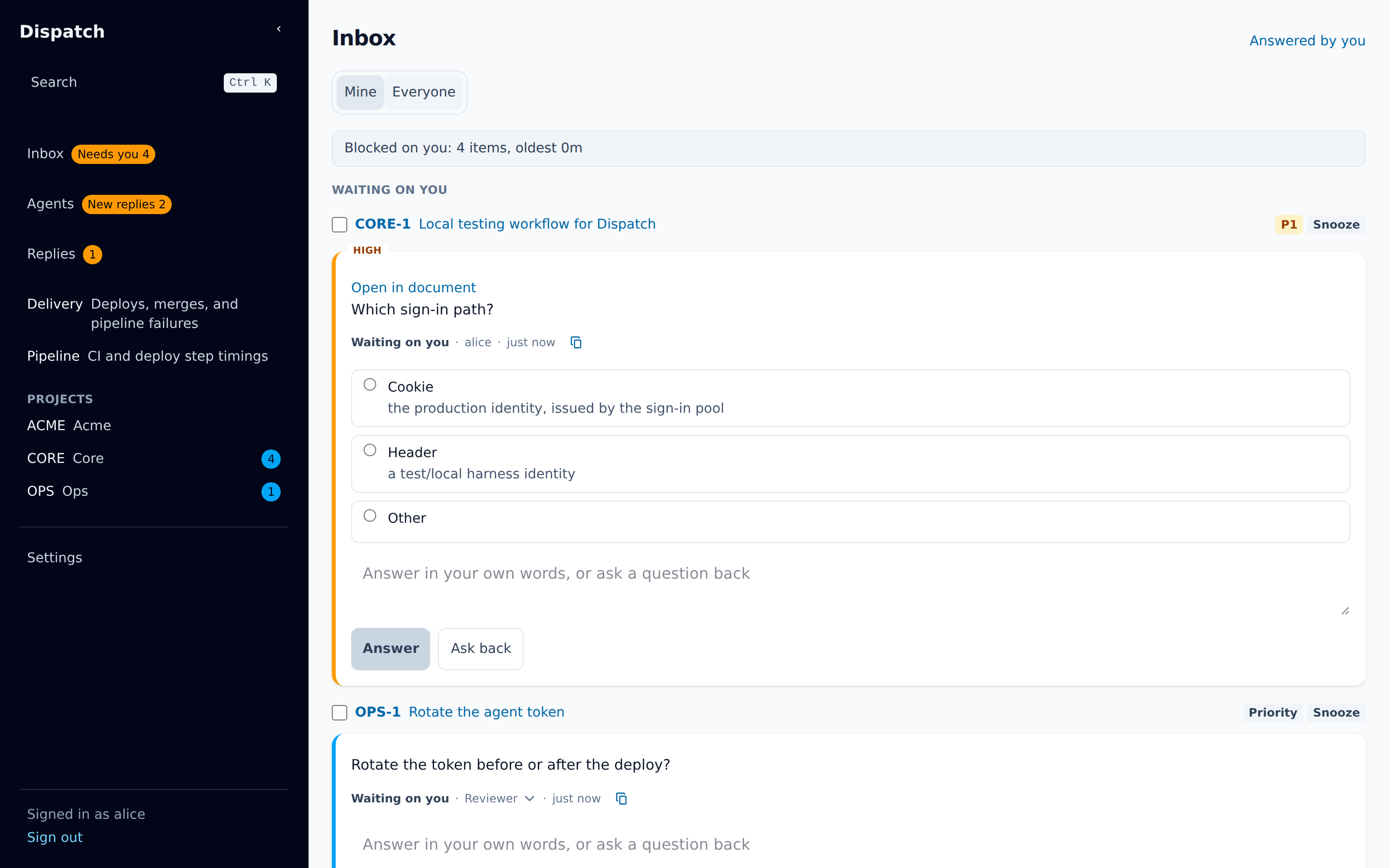
| Inbox | Every open question (an ask), split by whose turn it is. Start here. |
| Projects | A project’s issues as a List or a Board, its documents, and, when the project has one, its architecture. |
| Issue page | One issue: its header, the Spec, the Conversation, its child issues, and its files. |
| Agents | The agents connected right now. You can message one, or broadcast to many. |
| Delivery | How work reaches production: a timeline of merges and deploys, with the delivery measures and their targets above it. Pipeline, beside it, times each CI and deploy step over the last seven days. |
| Search | Ctrl+K (⌘K on a Mac) searches everything and lists the actions for the page you are on. |
| Settings | Projects, repository mappings, architecture sources, and the tokens your agents use. |
The sidebar links the Inbox, Agents, your pinned issues, every project, and Settings. The Inbox entry shows Needs you with a count when asks or credential requests are waiting on you. The Agents entry shows a count when an agent has replied to you and you have not read it.
Your first ten minutes
Section titled “Your first ten minutes”- Sign in. Open Dispatch in your browser, choose Sign in with Google, and sign in with your Google Workspace account; you must be in the group the server admits. You land on the Inbox.
- Answer one ask. Under Waiting on you, read the top question. Pick an option, or type an answer, and choose Answer. If the question is unclear, type what you need to know and choose Ask back instead. The Inbox and asks explains both.
- Open its issue. Choose the issue name at the top of the ask, or press
oon a focused row. Read the Spec tab, then press?to see every keyboard shortcut on that page.
Where to go next
Section titled “Where to go next”- The Inbox and asks: answering, asking back, snoozing, and approvals.
- Issues and projects: the List, the Board, filters, and the issue page.
- Documents: specs, versions, comments, suggestions, and decisions.
- Agents: messaging agents, broadcasts, and the live view.
- Keyboard shortcuts: every shortcut, by page.