Delivery
The Delivery page shows how work reaches production. A timeline of every merge, deploy and failed run sits under a panel of delivery measures. Both read the facts Dispatch stores from GitHub, and both follow the same window and filters. The Pipeline page beside it shows how long each step of CI and the deploy takes, day by day. Until the deploy repository and its workflows are set in Settings → Delivery timeline, the Delivery page shows that form instead.
The window and filters
Section titled “The window and filters”The page opens on the last 28 days. Window, in the page header, sets it: the last 7, 14, 28 or 84 days, or a custom range of whole days in UTC, both ends included. A preset rolls, so a link to the last 7 days always shows the latest 7; a custom range keeps its dates. The page reads at most 84 days, and refuses a longer custom range, saying so. Changing the window clears a dragged stretch.
The window, the search box and every filter (Repository, Parent agent, Session, Dispatch issue, Priority, Component, Author, rework, and whether a pull request has deployed) are written into the address, so a link shows the same figures to whoever opens it. Dragging across the timeline narrows the measures to the stretch you dragged over; the timeline itself keeps the whole window. clear brush window puts the measures back.
Live updates
Section titled “Live updates”An open Delivery or Pipeline page keeps itself current over one connection to Dispatch. A merge or a deploy appears within seconds, without a reload. Nothing reads again on a timer: Dispatch sends the page an update only when something it shows has changed, and each update carries only what changed, such as the pull requests and runs that moved, the counts beside the filters and the measures’ new numbers. A preset window keeps its end at the present, so a pull request or run leaves the page at the moment it ages out of the window. A deploy shows once its production job finishes, without waiting for the rest of its run.
Each page’s freshness row says Live while the connection is open, with how long ago the last change arrived. A source Dispatch reports as stale, or a failed reconcile, still shows in red with its age and error. While the connection is lost the row reads Reconnecting in red, with how long it has been lost; the page reconnects by itself and is sent only what changed while it was away. A page away for more than a day reads its window once, whole.
Grouping sessions
Section titled “Grouping sessions”A pull request’s Parent agent is the first agent session that wrote it, shown by the session’s title. One agent often runs as several sessions (it restarted, or it was resumed), and a session group puts them back together: every pull request a member wrote first counts under the group’s name, in the Parent agent filter, the colours, the lanes, the list, the details and the measures. The Session filter still lists each session on its own.
Edit groups, under the Parent agent filter, lists the window’s sessions with their titles and how many pull requests each wrote first. Select sessions and name them to make a group, and rename a group, add the selected sessions to it, remove a member, or delete it. Groups are shared: everyone who opens the page sees the same ones. A session can be in one group only, and two groups cannot share a name. A group may take a session’s title as its name only when it holds every session with that title, so one name never means two things. A session that later takes a group’s name as its title, without joining it, shows with its id beside the title. Deleting a group shows its sessions on their own again.
Colouring the merges by Parent agent adds Own colour and lane: the values you choose there each get a colour of their own, and a lane of their own when swimlanes are on, and every other value shares one Other colour and lane. With none chosen, the colours and lanes are as usual.
The measures
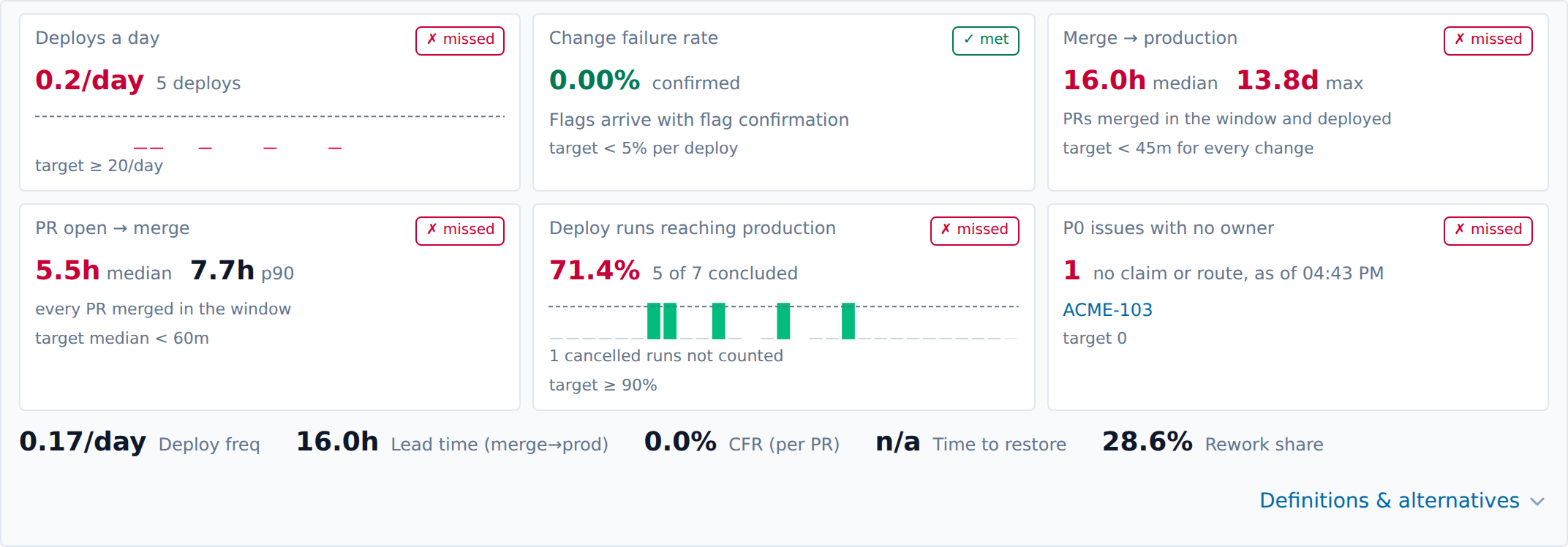
Section titled “The measures”Six cards across the top each judge one figure against its target: met, missed, or no data when the window holds nothing to measure. Below them, one line carries the headline numbers. Definitions & alternatives opens the other definitions of each figure and a per-day table, newest day first; a day the window only partly covers is marked partial.
- Deploy: a run of the deploy workflow on
mainwhose production job succeeded: a job named in Production jobs in Settings → Delivery timeline (a renamed job lists its old and new names) and, when Production apply step names a step, one whose step of that name succeeded too, so a run that stood down without applying is no deploy. A run counts on the day it started. Runs on other branches count in no figure. - Deploys a day: deploys in the window divided by the window’s length in days.
- Lead time: from a pull request’s merge to the first successful production deploy that contains it: the earliest to finish of the deploys whose run GitHub created after the merge. A merge queue writes its merge commit before GitHub records the merge, so the run’s creation, not its commit’s time, says which deploy holds a pull request. The cards show the median and the longest; the fold adds the 90th percentile and the time from the first commit and from opening the pull request.
- Pull request open → merge: the median and 90th percentile, over every pull request merged in the window.
- Change failure rate: confirmed failed changes over deploys (and, in the fold, over pull requests). Only a flag the dora role holder has confirmed counts; pending flags are shown separately, as the rate if every one were confirmed. Until flags are recorded the card says so, and the rate is zero.
- Time to restore: the median time from a broken pull request’s deploy to its fix’s deploy, over confirmed flags.
- Rework share: pull requests whose title starts with
fix,revertorhotfix, over all pull requests merged in the window. - Deploy runs reaching production: runs that reached the production job, over runs that concluded success or failure. A cancelled run is not an attempt, and the card counts it apart.
- P0 issues with no owner: open issues of priority P0 with neither a claim nor a route, in every project. It follows neither the window nor the filters, and each issue on the card links to it.
The filters narrow every figure drawn from pull requests: lead time, rework share and the per-pull request failure rate. Deploys and runs follow the window alone, and a deploy counts as one that shipped a pull request when it shipped any pull request merged in the window, whatever the filters.
The targets
Section titled “The targets”| Figure | Target |
|---|---|
| Deploys a day | at least 20 |
| Change failure rate, per deploy | under 5% |
| Merge → production, for every change | under 45 minutes |
| Pull request open → merge, median | under 60 minutes |
| Deploy runs reaching production | at least 90% |
| P0 issues with no owner | 0 |
“Under” is met strictly below the target. “At least” is met at the target.
For agents
Section titled “For agents”GET /api/v1/delivery/measures?from=<RFC 3339>&to=<RFC 3339> answers the same figures, the
targets, whether each is met, and the unowned P0 issues. It takes the timeline’s parameters:
from and to (the last seven days when both are left out, at most 84 days apart), q for the
search, and any filter repeated for several values, such as &repo=acme/widgets&priority=P0. Any
signed-in person or agent token reads it. GET /api/v1/delivery/timeline carries the same
answer as its measures for its own window and filters, so an agent reading both needs only the
timeline. The routes and the page’s live updates compute from the same stored facts with the same
code, so they agree. flags_source says whether recorded flags fed the change failure rate;
none means no flags are recorded yet.
GET /ws/delivery is the websocket the pages keep themselves current over, and any signed-in
person or agent token may open it. Each frame is one JSON object; DeliveryLive* in
packages/contracts/src/dispatch-api.ts types them all. A client subscribes to a view with
{"type": "subscribe", "sub": "<its own id>", "view": ...}, where the view is
{"kind": "timeline" | "measures", "window": {"preset": 28}, "query": "repo=acme%2Fwidgets"}
(a window is a preset of 7, 14, 28 or 84 days, or a custom {"from", "to"}; query is the GET
route’s query string without from and to), or {"kind": "pipeline"} with an optional at.
{"type": "unsubscribe", "sub"} ends one. Dispatch answers a subscription with:
- a
snapshot: the matching GET route’s body for the window resolved now, the change it reflects (seq), when that change was recorded (changed_at), and a revision for every key it holds; - then only
deltaframes: the pull requests, runs and session groups that changed (items, each list’supsertand the ids itremoves), the map entries and counts that changed (mapsandcounts, null for a key that left), and the fields replaced whole (set, which carrieswindowwhenever it moved, never alone); freshness, sent to every subscriber only when the freshness verdict changes;error, with the code the GET route would answer (INVALID_QUERY,DELIVERY_NOT_CONFIGURED) orINVALID_FRAME;heartbeat, every 15 seconds. While nothing the view shows changes, the heartbeat is the only frame sent: a reconcile pass that records nothing new sends nothing.
A client that reconnects subscribes again with "resume": {"seq", "revs"}, the last change it
applied and the revisions it holds, and is sent a delta of what changed since; a resume from
before the day of changes Dispatch keeps is answered with a snapshot. Dispatch closes every
socket with code 1012 when it restarts, and a client reconnects at once.
packages/dispatch/e2e/delivery-live-probe.ts is the way to watch the route from a checkout:
cd packages/dispatchbun e2e/delivery-live-probe.ts --url <dispatch> --token-file <file> \ --view '{"kind":"timeline","window":{"preset":28},"query":""}' --minutes 10 --compareIt subscribes under the token in the file, writes one JSON line per frame (at, type, bytes,
and the pull requests, runs, map keys, counts and set fields the frame carries), applies each
frame as the page does, and reconnects and resumes as the page does. When the time is up,
--compare reads the GET routes for the last window it applied and writes, for each, whether the
pull request ids, run ids and every measure equal what it holds; it exits 1 when one does not.
--body-file <file> writes the body it holds.
A session group’s Parent agent value is group:<id>, so a rename keeps every filter and link that
names it; the timeline’s session_groups lists every group with its name and sessions, beside
session_titles and session_pr_counts for the window’s sessions. POST /api/v1/delivery/session-groups ({name, sessions}) makes a group, PATCH /api/v1/delivery/session-groups/{id} ({name?, add?, remove?}) changes one, and DELETE removes
it. Any signed-in person or agent token may write them. A session another group holds is 409 SESSION_IN_GROUP, a name another group has 409 SESSION_GROUP_NAME_TAKEN, and a name that is the
title of a session outside the group 409 SESSION_GROUP_NAME_IS_SESSION_TITLE, each naming what it
refers to. The HTTP API reference lists them with every other
route.
Pipeline
Section titled “Pipeline”The Pipeline page (/pipeline, Pipeline in the sidebar under Delivery) shows how
long each step between a pull request and production takes, and how often it succeeds, over the
last seven UTC days. Today is the last day, drawn faded because it is not over. The page follows
neither the Delivery page’s window nor its filters. It updates itself live, as the Delivery page
does, and a deploy card moves as soon as the deploy job it times finishes. A pull request’s CI run
reaches the PR CI card and its two tables only when the five-minute reconcile records it,
since Envoy relays no event for a workflow run of a pull request.
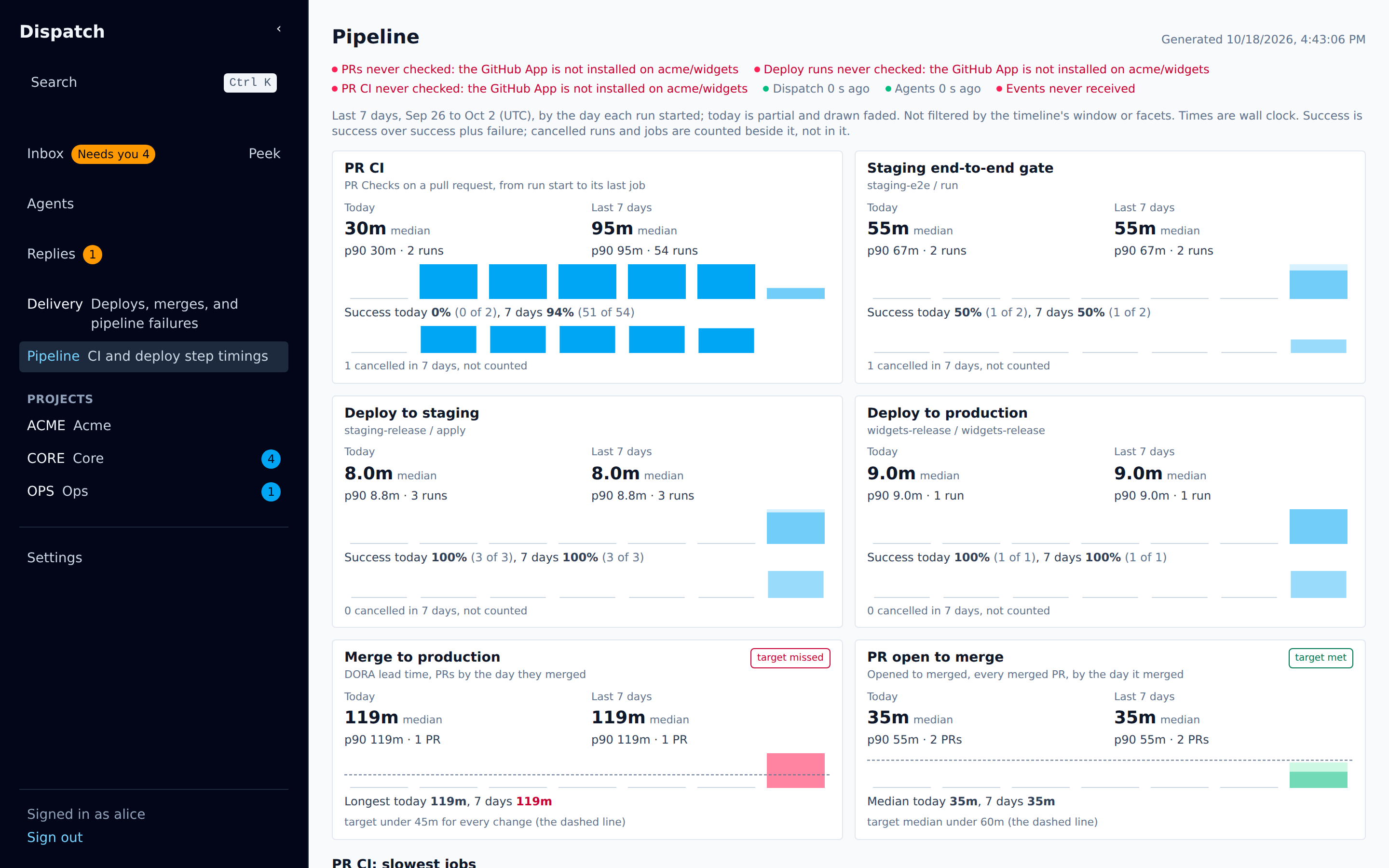
Each run counts on the day it started, and each job on its run’s day. Only a result that ended in success or failure is timed; a timed-out result is a failure. A cancelled run or job is counted beside the timed ones and kept out of the success rate, and anything else (skipped, still running) is not counted at all. Success is success over success plus failure. Times are wall clock; a step’s median and 90th percentile are rounded to a tenth of a minute.
- PR CI: runs of the pull-request checks workflow on a pull request (GitHub’s
pull_requestevent; merge-queue runs are not counted), from the run’s start to its completion. - Staging end-to-end gate, Deploy to staging and Deploy to production: the deploy
workflow’s jobs named in Settings → Delivery timeline, in its push runs on
main. The production card follows every listed production job name. A run started by hand, or on another branch, is not counted. The first two are optional settings; a pipeline that names neither has no such card. - Merge to production: the delivery lead time, by the day each pull request merged. A pull request still waiting has none yet. It is judged on the seven days’ longest change: the target is under 45 minutes for every change.
- PR open to merge: every merged pull request, deployed or not, by the day it merged. It is judged on the seven days’ median: the target is a median under 60 minutes.
PR CI: slowest jobs ranks the checks workflow’s jobs by their seven-day median, slowest first, and shows five. A job needs 50 timed results in the seven days to be ranked, so a rarely run job cannot top the table on a handful of results. Only jobs of runs that ended in success or failure are counted.
PR CI: jobs that failed in the last 24 hours lists every job that failed in a run completed in the last day, most failures first, with how many of its results there failed and a link to the run of its latest failure. A cancelled run’s jobs are not counted, and neither is the roll-up job named in Settings → Delivery timeline, which only reports the other jobs’ result and fails whenever any of them does, nor a notification or guard step.
For agents, GET /api/v1/delivery/pipeline answers the same numbers. Its optional at
(RFC 3339) names the day the seven days end on and the moment the failing jobs look back from;
left out, it is now. Any signed-in person or agent token reads it.