Agents
The Agents page lists the agent sessions connected right now, and is where you talk to them.
Open it from the sidebar, or press g then a.
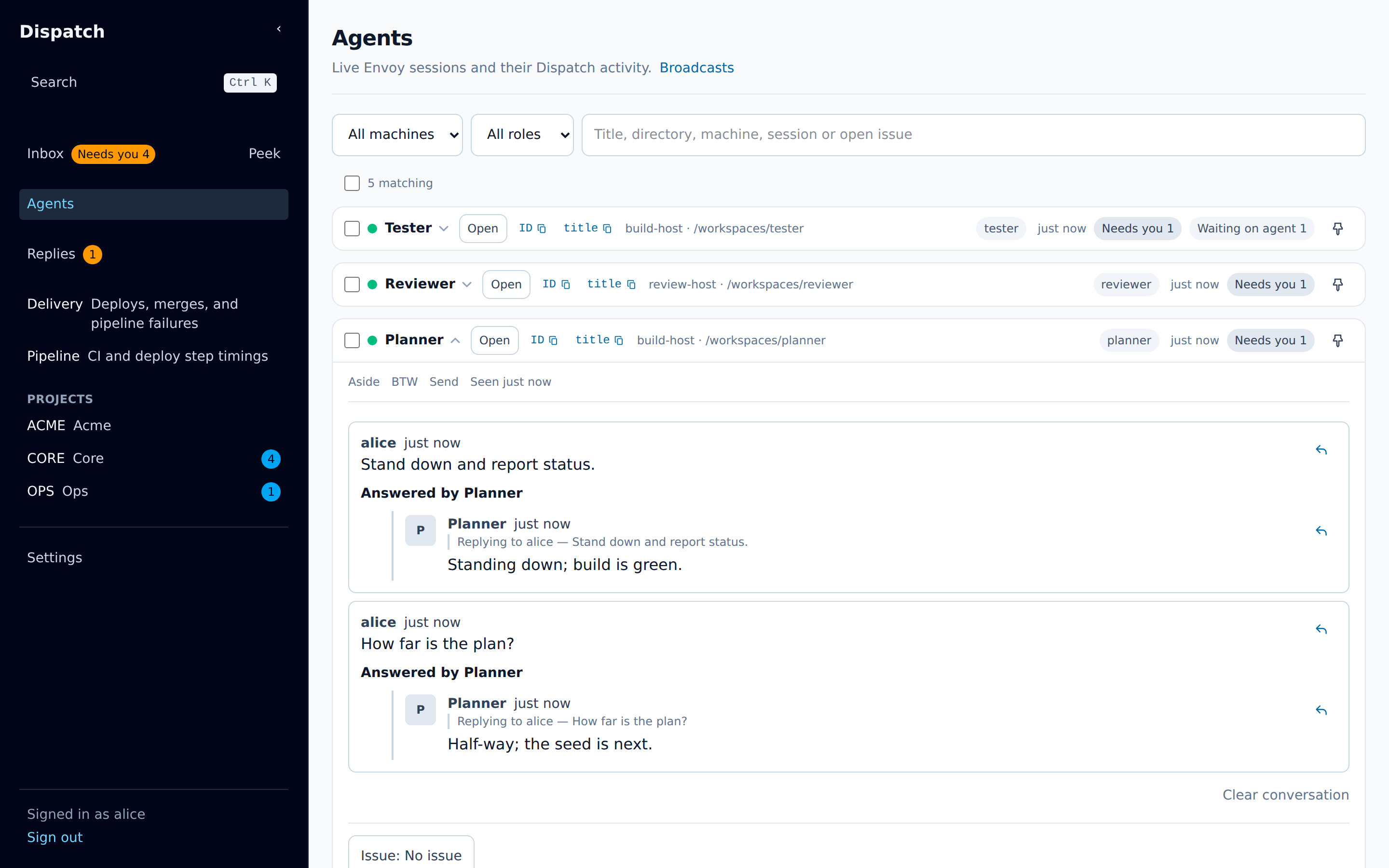
The list
Section titled “The list”Each row is one agent session. It shows:
- a dot for how recently the session was seen: under two minutes, under ten, or longer,
- the session’s title and when it was last active in Dispatch,
- Needs you N when it has asks waiting on your answer, which opens your Inbox filtered to them,
- Waiting on agent N when it has asks where it owes the next move,
- a count of its replies you have not read,
- Open, which opens the live view,
- a pin, and a checkbox for broadcasts.
Pinned agents come first. After them come the agents with asks waiting on you, then those with the most open asks, then the most recently active.
Two folded groups sit below the list:
- No Dispatch activity holds sessions that are connected but have not written anything to Dispatch.
- Inactive holds sessions not seen for ten minutes or longer.
A pinned agent stays in the main list whatever its state.
Filters
Section titled “Filters”Above the list, three filters narrow it: Machine, Role, and a search box. Typing in the
search box keeps the sessions whose title, directory, machine, session id, or the key of an issue
one of its open asks names, together hold every word typed, in any order and case; pressing /
anywhere on the page focuses the box. A non-empty search also opens the two folded groups below,
so a match hidden in one of them still shows; clearing the search returns each fold to the state
you left it in. The search survives a reload through the page’s address.
Sending to one agent
Section titled “Sending to one agent”Choose an agent’s title to open its row. The row shows your recent exchanges with that agent and a message box.
By default the message goes straight to the agent, on no issue. Choose Choose issue to file it on an open issue instead; it is then posted on that issue as a comment that mentions the agent.
Press Ctrl+Enter (⌘Enter on a Mac) to send.
Send, Aside, and BTW
Section titled “Send, Aside, and BTW”How a message reaches the agent depends on its mode:
| Mode | What the agent does with it |
|---|---|
| Send | Takes it as if you had typed it into its terminal and pressed Enter. |
| Aside | Picks it up at its next step. |
| BTW | Answers it in a side turn, without adding it to its main conversation, and the answer is posted back as its reply. |
A message is a Send unless you start it with /aside or /btw . Each session takes only the
modes it advertises. A Claude Code session, for example, takes Aside but not Send. If you write in a
mode the session does not take, the message box warns you and suggests a prefix it does take.
On an Oh My Pi session, your Send or Aside arrives as your own message in its conversation, and the
agent answers there. A Send or Aside that starts with / runs as the session’s terminal would run
it. A command that prints output, such as /session or /compact, posts that output as the
session’s Reply via Dispatch; one that runs only in the session’s own terminal says it did not
run. Watch either result in the live view.
Broadcasts
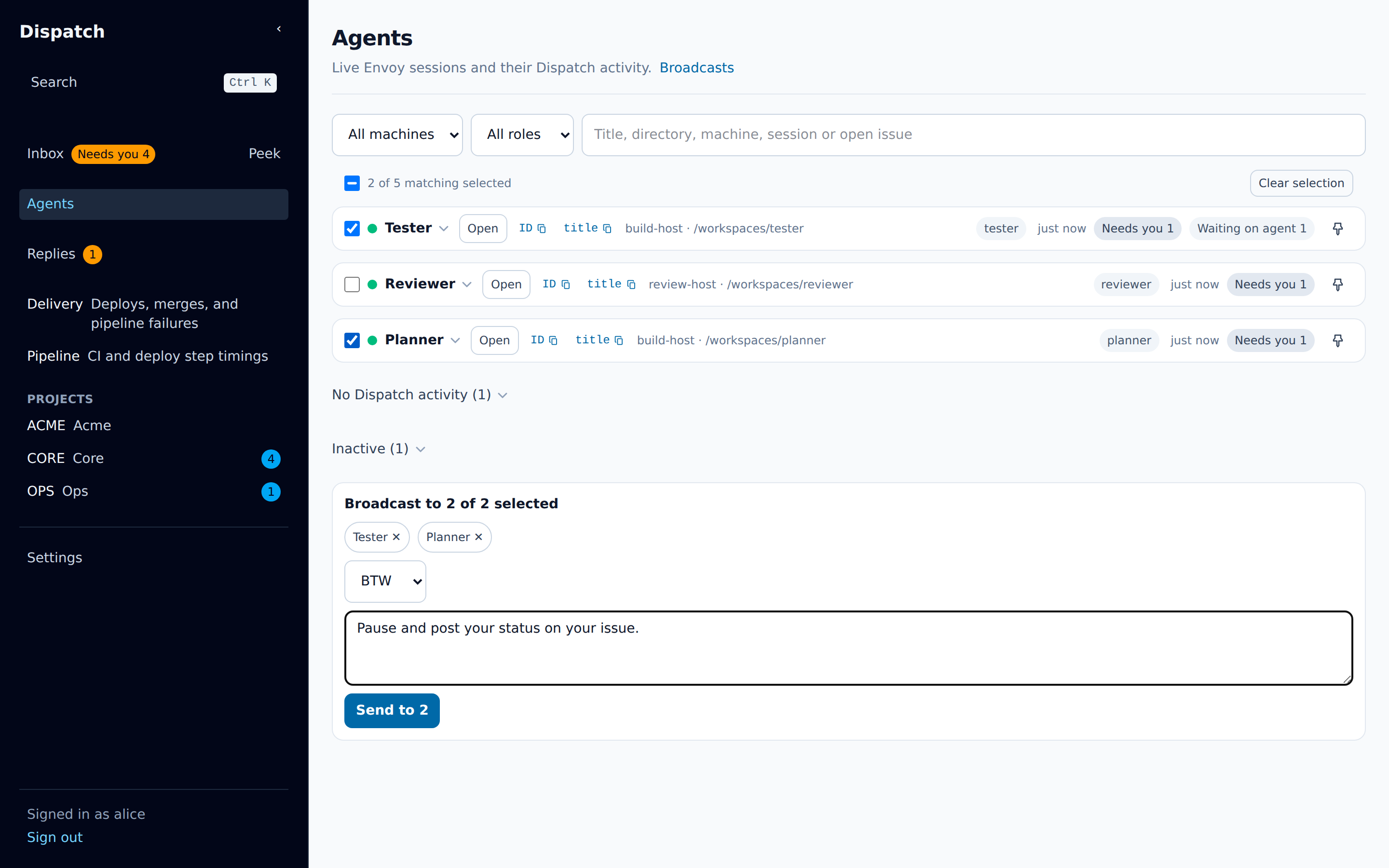
Section titled “Broadcasts”A broadcast sends one message to many agents.
- Tick the checkbox on each agent you want, or press
xon a focused row. The checkbox above the list, Select all matching agents, ticks every agent the filters match, including those in the folded groups. - A broadcast box appears at the bottom of the page. Its heading counts the recipients, for
example
Broadcast to 3 of 4 selected, and each selected agent is a chip you can remove. - Pick the mode, type the message, and choose Send to N.
An agent that does not take the mode you picked is left out, and its chip says why. Dispatch never switches it to another mode. One broadcast reaches at most 100 agents.
Your selection is what you ticked, not what the filters show. Narrowing the filters after you tick does not drop anyone; the count beside the checkbox says how many selected agents are outside the filter. Clear selection empties it.
Each send gets a row above the broadcast box: Queued, Sending to N…, Sent to N agents, or
Could not send to N with the reason. A failed row offers Retry, which sends the same request
again, and Restore draft, which puts the message and the selection back in the box.
After a send, Dispatch opens that broadcast’s page. It lists every recipient, whether the message was delivered, and each reply. A recipient whose delivery failed has a retry. The Broadcasts link at the top of the Agents page lists earlier broadcasts.
Unread replies
Section titled “Unread replies”When an agent replies to a message you sent it, the reply counts as unread. The count shows on the Agents entry in the sidebar and on the agent’s row. Opening the row, or the agent’s live view, marks those replies read, on every device you are signed in on.
When an agent with unread replies disconnects, it moves to a Replied, no longer connected group at the end of the page, so you can still read what it said.
The live view
Section titled “The live view”Open on an agent’s row shows its conversation as it happens, at /agents/<session>/live.
- The header shows whether the session is connected, and its machine and directory.
- When the session reports which model it’s running, the header shows it, and each assistant turn shows the model that produced it. It updates as the session switches models, and a label too long for its space truncates, showing the full name on hover. Claude Code and OpenCode sessions don’t publish this today, so their view is unchanged.
- The agent’s turns stream in while the page is open. They are relayed, not stored.
- Your messages to the agent, and its replies through Dispatch, are stored and shown in the same thread. A reply through Dispatch is labelled Reply via Dispatch.
- The message box at the bottom sends to the agent. Send as picks the mode, from the modes the
session takes. When this is Send or Aside and the session publishes a command list, type
/to choose from its commands. The list marks commands that only the session’s terminal runs; their reply says they did not run. Use the arrow keys to choose, Tab or Enter to pick, and Escape to close the list. BTW offers no commands.
Some sessions cannot stream their conversation, such as Claude Code sessions. The live view says so, and still shows your messages and their replies.
The keyboard shortcuts page lists the Agents page’s keys.